Remove Duplicates from Excel Files Instantly & Securely

Clean your Excel spreadsheets with our powerful online duplicate remover tool. Fast, secure, and completely free - your data never leaves your computer.

Upload Your Excel File to Get Started

Select your Excel file (.xlsx, .xls, .csv) and configure duplicate removal settings. All processing happens in your browser - your data stays completely private.

Choose Excel File

Drag and drop your Excel file here, or click to browse

Supports .xlsx, .xls, .csv, and .xlsm files

100% Private Processing
No Installation Required
Completely Free

Need help getting started? Check out our frequently asked questions or browse our Excel tips and tutorials for expert guidance.

Latest Excel Tips & Tutorials

Stay updated with our latest guides and expert insights to master Excel data management.

Remove Excel Duplicates in 3 Simple Steps

Our streamlined process makes duplicate removal quick and effortless. Follow these three steps to clean your Excel data in minutes.

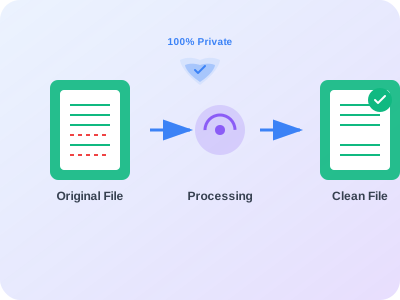
Excel data processing workflow illustration showing the three-step duplicate removal process
Step 1

Upload Your Excel File

Select your Excel file (.xlsx, .xls, .csv) from your computer. The file is processed entirely in your browser - no uploads to servers.

Step 2

Configure Duplicate Settings

Choose which columns to compare, set case sensitivity options, and preview duplicates before removal to ensure accuracy.

Step 3

Download Clean File

Get your cleaned Excel file instantly with duplicates removed. Original formatting and formulas are preserved throughout the process.

Why Choose Our Excel Duplicate Remover?

Our advanced duplicate removal tool offers unmatched security, performance, and ease of use. Discover what makes us the preferred choice for professionals worldwide.

Most Secure

Complete Data Privacy

Your Excel files are processed entirely in your web browser using advanced client-side technology. No data ever leaves your computer or gets uploaded to servers.

Trusted by thousands of professionals
Instant Results

Lightning Fast Processing

No waiting for uploads or server processing. Local processing means your duplicates are removed in seconds, not minutes, regardless of file size.

Trusted by thousands of professionals
AI-Powered

Advanced Duplicate Detection

Smart algorithms detect duplicates across multiple columns with flexible matching options including case sensitivity and whitespace handling.

Trusted by thousands of professionals
All Formats

Universal File Support

Works with all Excel formats including .xlsx, .xls, .csv, and .xlsm files. Preserves formatting, formulas, and multiple worksheets.

Trusted by thousands of professionals
Zero Risk

Preview Before Processing

See exactly which duplicates will be removed before processing. Review and verify results to ensure accuracy before making changes.

Trusted by thousands of professionals
100% Free

Completely Free Forever

No hidden costs, subscription fees, or usage limits. Professional-grade duplicate removal capabilities available to everyone at no cost.

Trusted by thousands of professionals

Advanced Excel Data Cleaning Made Simple

Whether you're managing customer databases, inventory lists, or financial records, duplicate entries can compromise data accuracy and lead to costly mistakes. Our Excel duplicate remover tool eliminates these issues with sophisticated algorithms that detect and remove duplicates while preserving your data's integrity.

Unlike basic duplicate removal features found in Excel, our tool offers advanced configuration options, preview capabilities, and support for complex matching scenarios. You can remove duplicates based on specific columns, handle case sensitivity, and even process multiple worksheets simultaneously.

The best part? Everything happens directly in your web browser using cutting-edge client-side processing technology. Your sensitive business data never leaves your computer, ensuring complete privacy and security while delivering professional-grade results. Learn more about our privacy policy and data protection practices.

Smart Duplicate Detection

Advanced algorithms identify duplicates across multiple columns with flexible matching criteria.

Complete Data Privacy

Client-side processing ensures your files never leave your computer or get uploaded to servers.

Lightning Fast Processing

Local processing eliminates upload times and delivers results in seconds, not minutes.

Excel duplicate removal process illustration - secure client-side processing with data privacy protection, showing spreadsheet transformation from duplicate-filled to clean data

Ready to Clean Your Excel Data?

Join thousands of professionals who trust our Excel duplicate remover for their data cleaning needs. Start processing your files today with complete confidence in your data's security.